
Zoom meetings are lagging. The printer goes offline every Tuesday. File transfers take 20 minutes instead of 20 seconds.
For small businesses (SMBs), poor network connectivity is more than just a nuisance; it directly impacts productivity.
Many small business owners make the mistake of using their $50 home router to run an office network for 20 people. But business networks are different. They need to handle VoIP calls, surveillance cameras, and visitor traffic simultaneously, and they can’t afford to crash.
For IT installers and office managers, this is the ultimate list for building a “one-and-done” network infrastructure by 2025.
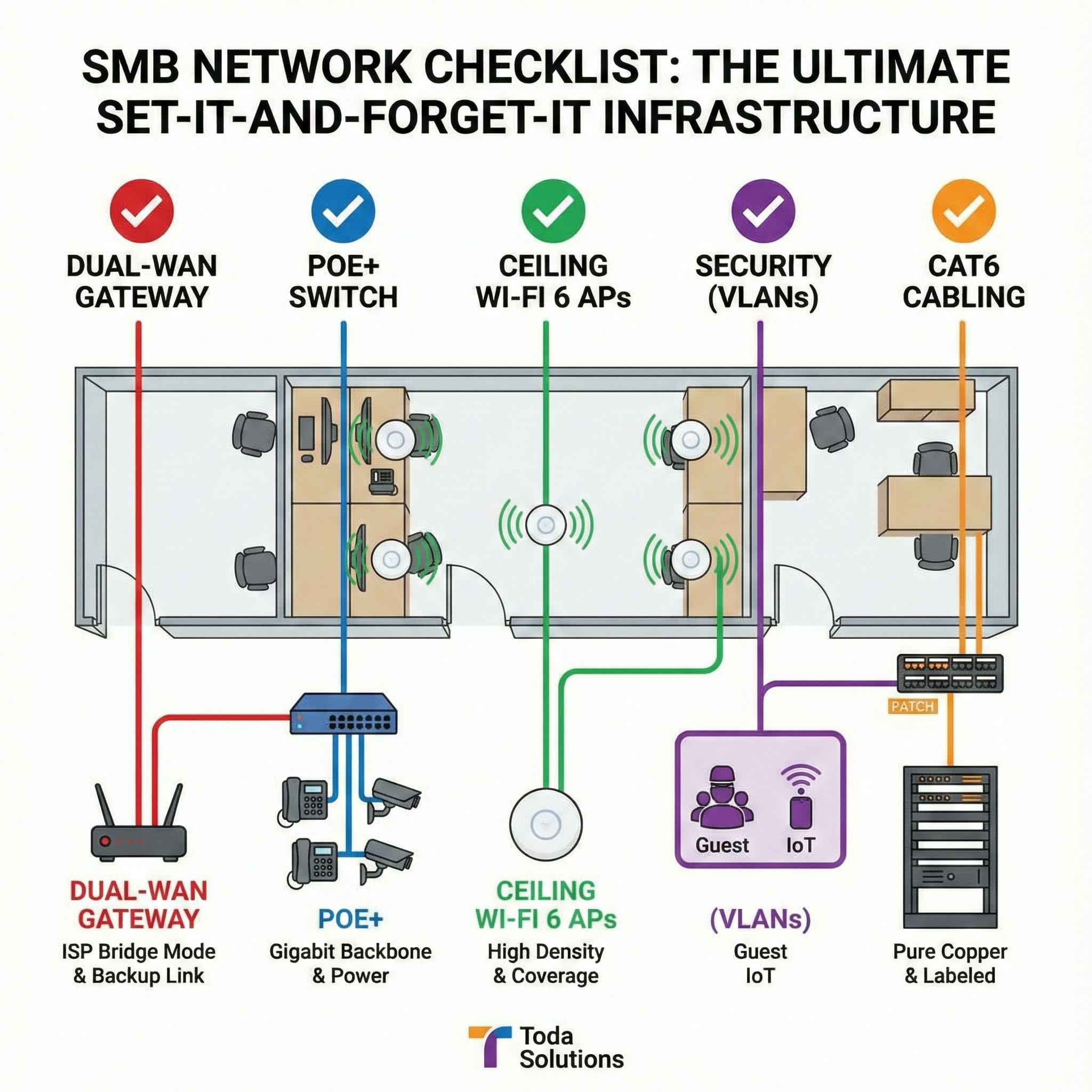
1. The Gateway: Abandon the ISP Box
Internet Service Provider (ISP) modem/router combos are typically subpar. They are designed for basic home use, not for routing traffic to 30+ devices.
✅ The Checklist:
-
Bridged Mode: Put the ISP modem into “Bridged Mode” so that it operates only as a modem, passing the public IP directly to your own router.
-
Dual-WAN Router: Select a dedicated enterprise router that supports Dual-WAN internet connections (such as the Toda Enterprise Gateway). If the main fiber optic line is interrupted, the router will automatically switch to the backup 4G/5G connection, achieving zero downtime.
-
VPN Support: Ensure your router supports L2TP or OpenVPN so employees can securely access files while working from home.
2. The Switch: The Backbone of the Office
While Wi-Fi is certainly appealing, the switch is the truly crucial device. All stationary equipment (desktops, printers, IP phones) should use wired connections to reduce airtime congestion.
✅ The Checklist:
-
Upgrade to Gigabit (or 2.5G): 100Mbps switches are outdated and should not be purchased in 2025.
-
PoE+ is Essential: Don’t equip each desktop phone or wireless access point with a power adapter. Use a Toda PoE+ Switch (Power over Ethernet). It transmits power and data simultaneously over the same network cable.
Pro Tip: Calculate your PoE budget. If you have 10 cameras and 5 APs, make sure your switch has enough total power budget (e.g., 200W or more) to power them all simultaneously.
3. Wi-Fi: Coverage Does Not Equal Capacity
A common mistake is buying a “super-powerful” router and placing it in a corner. This results in a strong signal in the lounge but dead zones in the meeting room.
✅ The Checklist:
-
Ceiling-Mounted Access Points (APs): These move the Wi-Fi signal to the ceiling, bypassing obstacles like partition walls and filing cabinets.
-
Calculate User Density: It is recommended to calculate 3 devices per employee (Laptop + Mobile Phone + Watch/Tablet). An office of 20 people requires a network capable of handling 60+ concurrent connections.
-
Go with Toda Wi-Fi 6 APs: Use the Wi-Fi 6 (AX3000) standard. They utilize OFDMA technology to handle more concurrent connections than older Wi-Fi 5 models, significantly reducing video call latency.
4. Security: Isolate Your Traffic (VLANs)
If you wouldn’t leave your filing cabinets open in the lobby, why would you want visitors connected to your main network?
✅ The Checklist:
-
Guest VLAN: Create a completely separate Wi-Fi network for guests (e.g., “Company_Guest”). Configure this network so they can access the internet but cannot access your local server or printer.
-
IoT VLANs: Smart light bulbs, fridges, and cheap sensors are often insecure. Isolate them in a separate Virtual Local Area Network (VLAN) so they don’t become entry points for hackers.
-
Hardware Requirement: You need a Toda Managed Switch (or “Smart Switch”) to configure these VLANs. Cheap “Unmanaged” switches cannot do this.
5. The Physical Layer: Don’t Skimp on Cabling
We’ve seen expensive networks worth $5,000 fail simply because installers used cheap Copper-Clad Aluminum (CCA) cables.
✅ The Checklist:
-
Pure Copper CAT6: Ensure that all cables are rated CAT6 or CAT6A and are made of Pure Copper. Avoid CCA cables at all costs.
-
Label Everything: Label every cable on the patch panel. You’ll thank yourself three years later when a port fails.
-
Ventilation: Network equipment generates heat. If routers, switches, and NVRs are stacked in an enclosed cabinet, they will overheat and degrade performance. Use small, well-ventilated racks.
Do It Right, Do It Once
A network for small and medium-sized businesses is an investment. Buying a cheap router today to save $100 can result in a $1,000 loss in productivity over a year.
Toda offers a complete range of hardware solutions for SMB offices, from Multi-WAN Gateways to Smart PoE Switches and Ceiling-Mounted Access Points. Our equipment is designed for installers looking to deploy reliable, plug-and-play systems.
Planning an office renovation? [Contact Us Today] Send us your floor plan, and our engineering team will help you design a heat map and Bill of Materials (BOM) free of charge.
Post time: Dec-26-2025


