
The switch's IGMP snooping checkbox is enabled, but camera traffic still appears on ports with no viewers. Another installation has the opposite symptom: video starts correctly and disappears several minutes later. Neither fault can be resolved reliably by checking the same box again.
IGMP snooping uses observed IPv4 multicast membership information to help a Layer 2 switch decide where particular traffic should be forwarded. A working arrangement also depends on VLAN scope, membership maintenance, router-facing paths and the implementation's treatment of traffic without a learned group entry.
Start with one known stream and one known receiver. Establish what the switch has learned, then compare that state with the traffic actually leaving its ports.
Confirm that the traffic is multicast
Record the source, multicast group, receiver and VLAN. Check the application configuration or an appropriate packet observation. A collection of separate unicast streams does not become multicast merely because several viewers display the same camera.
This distinction determines the next investigation. IGMP snooping will not deduplicate independent unicast sessions. If the system uses IPv6 multicast, review its MLD-related functions instead of assuming that an IPv4 IGMP setting governs it.
Also distinguish the media traffic from discovery and control traffic. Some multicast addresses and protocols receive special treatment. A small amount of multicast visible on many ports is not by itself proof that the high-bandwidth video group is being flooded incorrectly.
Inspect the group table in the correct VLAN
Identify the receiver port and check whether it appears as a member of the intended group in the intended VLAN. The same group address in another VLAN does not establish membership here. Confirm that the receiver's reports reach the switch and that snooping is enabled in the relevant scope.
Then inspect the required uplink or multicast-router-facing port behavior. A receiver may be several switches away, so the path must preserve the relevant control and data traffic across those devices. A local group entry on one access switch does not prove the entire route is configured correctly.
Cisco's industrial-switch IGMP guidance documents the relationship among snooping, membership and querier configuration for that platform. Use the corresponding manual for the installed equipment; commands and defaults are not portable assumptions.
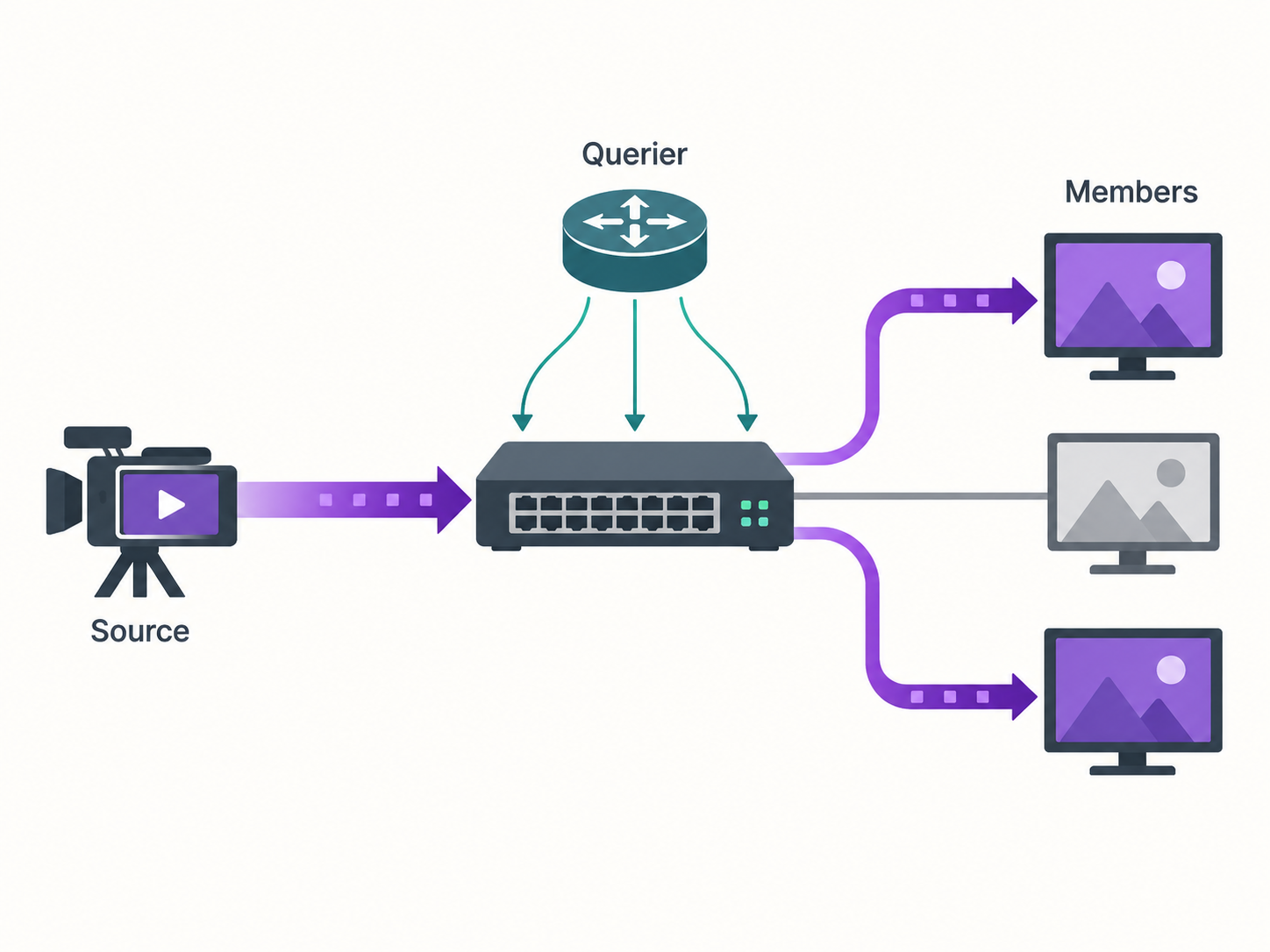
Verify who maintains membership
In a dynamic membership design, queries prompt receivers to refresh their interest. A multicast router may provide the querier role; some switches can provide a snooping querier for a suitable Layer 2 arrangement. Determine which device is intended to perform that role in each relevant VLAN.
Verify actual query traffic and group aging behavior. Do not assume the presence of a Layer 3 interface or a menu option means an active querier is operating. Check its supported version, addressing and election behavior according to the selected platform.
An installation that works immediately after a receiver joins but fails later deserves an aging investigation. Observe whether group entries expire, whether queries are present and whether reports return. An arbitrary longer timer may hide the symptom without fixing the missing control path.
At the same time, avoid treating one universal querier setting as the answer for every network. The correct design depends on the multicast architecture, VLANs and participating devices. Keep the intended role and failover behavior in the configuration record.
Unknown multicast behavior changes the symptom
When the switch lacks an applicable learned group entry, its forwarding policy may flood, restrict or otherwise handle the traffic according to platform settings. Learn that policy before interpreting a capture from an uninterested port.
Flooding can explain bandwidth consumption on ports that never joined. Aggressive filtering can explain a receiver that sees nothing when its membership has not been learned. Neither policy substitutes for a correct control plane.
Use a controlled join test. Begin with the receiver stopped, record the table and traffic, start the receiver, then observe the membership and forwarding changes. Stop it through the application's normal process and observe the leave and eventual aging behavior. Record what changes at each stage rather than inspecting only the final state.
Use symptoms to choose the next observation
| Symptom | Evidence to collect | Likely area for further investigation |
|---|---|---|
| Video reaches every access port | Group table and egress traffic for the specific stream | Unknown-group handling, snooping scope or missing membership |
| Video stops after an interval | Queries, reports and entry-aging timeline | Membership maintenance and querier reachability |
| One receiver works and another does not | Both receiver reports and their port/VLAN assignments | Local port configuration, receiver behavior or path differences |
| One viewer leaving interrupts another | Shared-port topology and leave handling | Fast-leave assumptions with multiple downstream receivers |
| Failure appears after a ring change | Group and router-port state before and after the change | Multicast behavior on the alternate path |
These observations narrow the investigation; they do not establish a cause without the corresponding test. Preserve the stream identity and timestamps so data from different switches can be compared meaningfully.
Be careful with fast leave on shared ports
A switch may offer an immediate or fast-leave behavior intended to stop forwarding promptly when a receiver leaves. That can be useful under the supported conditions, but a port leading to several receivers needs special care.
If multiple interested receivers sit behind one downstream switch or bridge, one receiver leaving does not necessarily mean the entire port has no members. Check the implementation's requirements before enabling the function there. Test the actual topology with one receiver leaving while another remains active.
This is an operationally important case because a single-viewer bench test can pass. The fault appears only after more viewers are added and their session behavior differs. Include the shared-port case when it exists in the site's intended design.
Snooping does not provide multicast routing by itself
Forwarding within a VLAN and delivering multicast between VLANs are separate design tasks. If the receiver is on another subnet, review the required Layer 3 multicast function and its support at the relevant devices. A snooping setting on an access switch does not create that routed service.
Likewise, IGMP version support should match the application's membership requirements. Where source-specific behavior is required, confirm the relevant host and network support rather than assuming all group handling is equivalent.
For a TODAHIKA Layer 2 managed-switch inquiry, describe the source/receiver topology, VLANs, IGMP versions and required querier behavior. Ask for model-specific confirmation and the controls needed to inspect the forwarding state.
Accept multicast as a sequence of changes
Test a receiver joining, remaining active through membership-refresh cycles, leaving and rejoining. Include multiple receivers on a shared downstream path if the site uses one. Where redundancy is required, repeat the relevant sequence during the approved link-failure and restoration cases.
Observe useful video and the specific stream's egress behavior at interested and uninterested ports. Keep the group-table evidence and settings with the result. The acceptance claim should explain how membership is maintained and how the network behaves when that membership changes—not simply state that IGMP snooping was enabled.
Post time: Oct-06-2026


