
The difference is obvious when you look at the price list. A 24-port unmanaged PoE switch might cost $80, while the same 24-port managed switch might cost $150.
For savvy small business owners, the choice seems simple: “I just need to plug my computer in. Why pay double for features I don’t understand?”
However, for System Integrators and IT Installers, choosing the cheaper option is often a trap.
At Toda, we manufacture both types of switches. We appreciate the ease of use of unmanaged switches, but we also know exactly when they will fail you. Here is an objective analysis to tell you when to save money and when to invest in a managed switch.
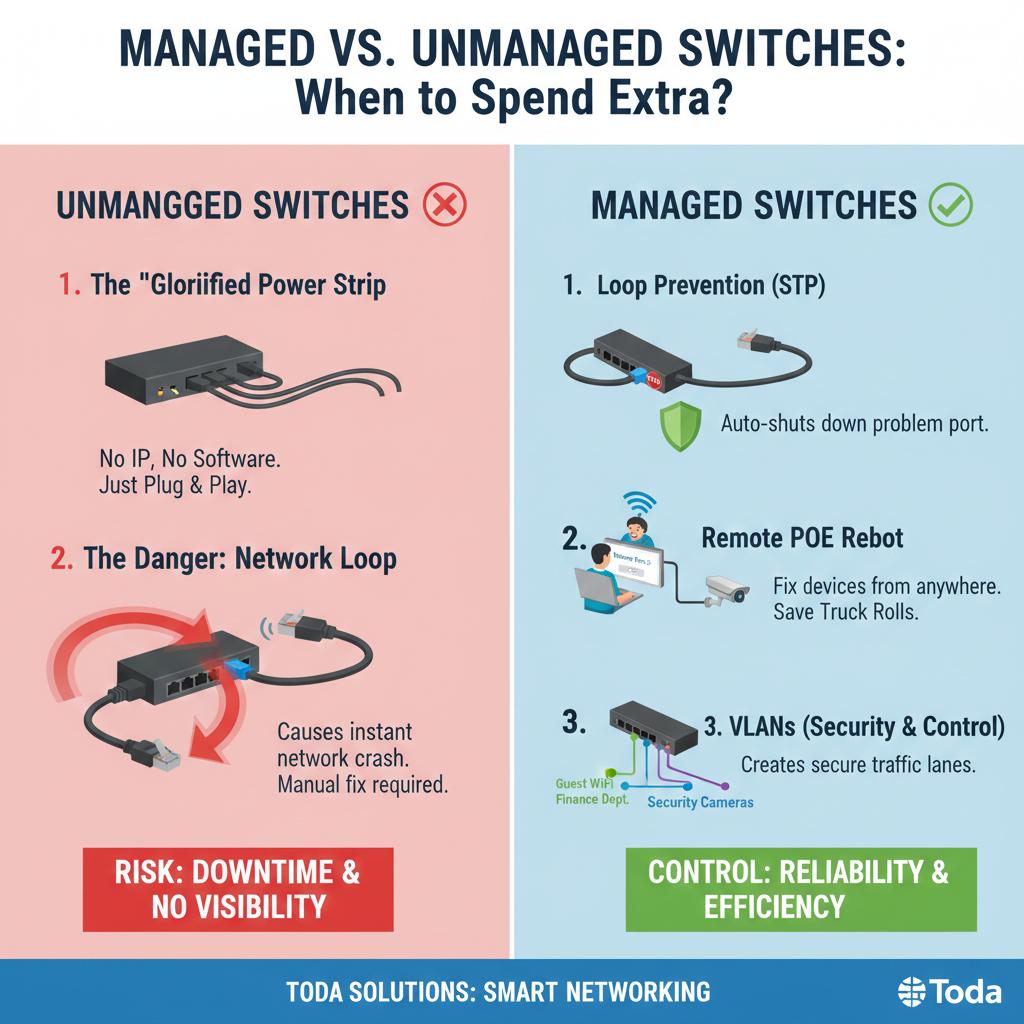
1. Unmanaged Switches: The “Advanced Power Strip”
An unmanaged switch is a true “plug-and-play” device. It has no IP address, no login page, and no pre-installed software. It simply receives data from Port 1 and sends it to the destination.
-
Advantages: Inexpensive, requires zero configuration.
-
Disadvantages: It lacks transparency. If the network speed is slow, you can’t tell why. You can’t see which port is hogging all the bandwidth.
⚠️ The Danger Zone: Network Loops
Scenario: An employee accidentally plugs both ends of a single Ethernet cable into two wall sockets connected to the same switch.
Result: On an unmanaged switch, this triggers a “Broadcast Storm.” Data loops indefinitely, causing the entire office network to crash instantly. The only solution is to physically unplug network cables one by one until the faulty cable is found.
2. Managed Switches: The Network Controller
Managed switches (such as Toda’s L2+ series) allow you to log in, configure, and monitor each port. They give you control.
Here are the three features that make the extra investment worth it:
A. Loop Prevention (STP)
Remember the disaster scenario mentioned above? Managed switches use a protocol called Spanning Tree Protocol (STP). If it detects a loop, it automatically shuts down the specific port within milliseconds. The rest of the office continues to function normally.
Value: It prevents a careless user from taking down the entire company system.
B. Remote PoE Reboot (The End of “Truck Rolls”)
This is a game-changer for surveillance camera and Wi-Fi installers. Sometimes, IP cameras or Access Points freeze.
-
Unmanaged Way: You drive to the site (truck roll), find the server room, and physically unplug the cable to restart it. Cost: 2 hours of labor + fuel.
-
Managed Way: You remotely log in to the switch, click “Disable” on Port 5, wait 10 seconds, and click “Enable.” The camera restarts. Cost: 2 minutes while drinking coffee.
C. VLANs (Security and Traffic Control)
You cannot mix Finance Department data with Guest Wi-Fi traffic on the same line. Managed switches allow you to tag traffic with VLANs (Virtual Local Area Networks), creating invisible firewalls between different types of users on the same physical switch. This is crucial for any secure business environment.
Summary: Which One Should You Buy?
Buy Unmanaged If:
-
It is a small home office with only 3–5 users.
-
It is an “Edge” switch (e.g., a small 5-port switch under a desk connecting just a PC and a printer).
-
Budget is the only priority, and downtime is not critical.
Buy Managed (Smart / L2) If:
-
You are an ISP or MSP: You need to diagnose problems remotely to save on labor costs.
-
You have IP Cameras: You need to ensure video traffic is prioritized (QoS) to avoid buffering.
-
You have 20+ Users: The risk of network loops or congestion is too high to fly blind.
Toda’s Recommendation
For most SMB projects in 2025, the “Smart Managed” (Web-Managed) switch is the sweet spot. It offers 90% of the functionality of a fully managed enterprise switch but at a price point only slightly higher than an unmanaged one.
Don’t let a mere $5 cable loop ruin your reputation. Upgrade your Bill of Materials (BOM) with Toda managed switches to build a self-defending network for your customers.
[View Toda Managed Switch Series]
Post time: Jan-27-2026


