
Ten years ago, “school Wi-Fi” simply meant providing internet access for teachers’ laptops and computer labs.
Today’s classrooms are completely different.
Imagine 30 students, each with a Chromebook or iPad. Interactive whiteboards are streaming 4K videos. Students are simultaneously uploading their assignments to the cloud.
If you are planning a network upgrade for your school district or university, Wi-Fi 6 (802.11ax) is not just a nice-to-have upgrade—it is an essential technology. Here is why.
The Problem: It’s Not Speed, It’s “Airtime”
When teachers complain that “the Wi-Fi is slow,” they usually mean high latency, not low bandwidth.
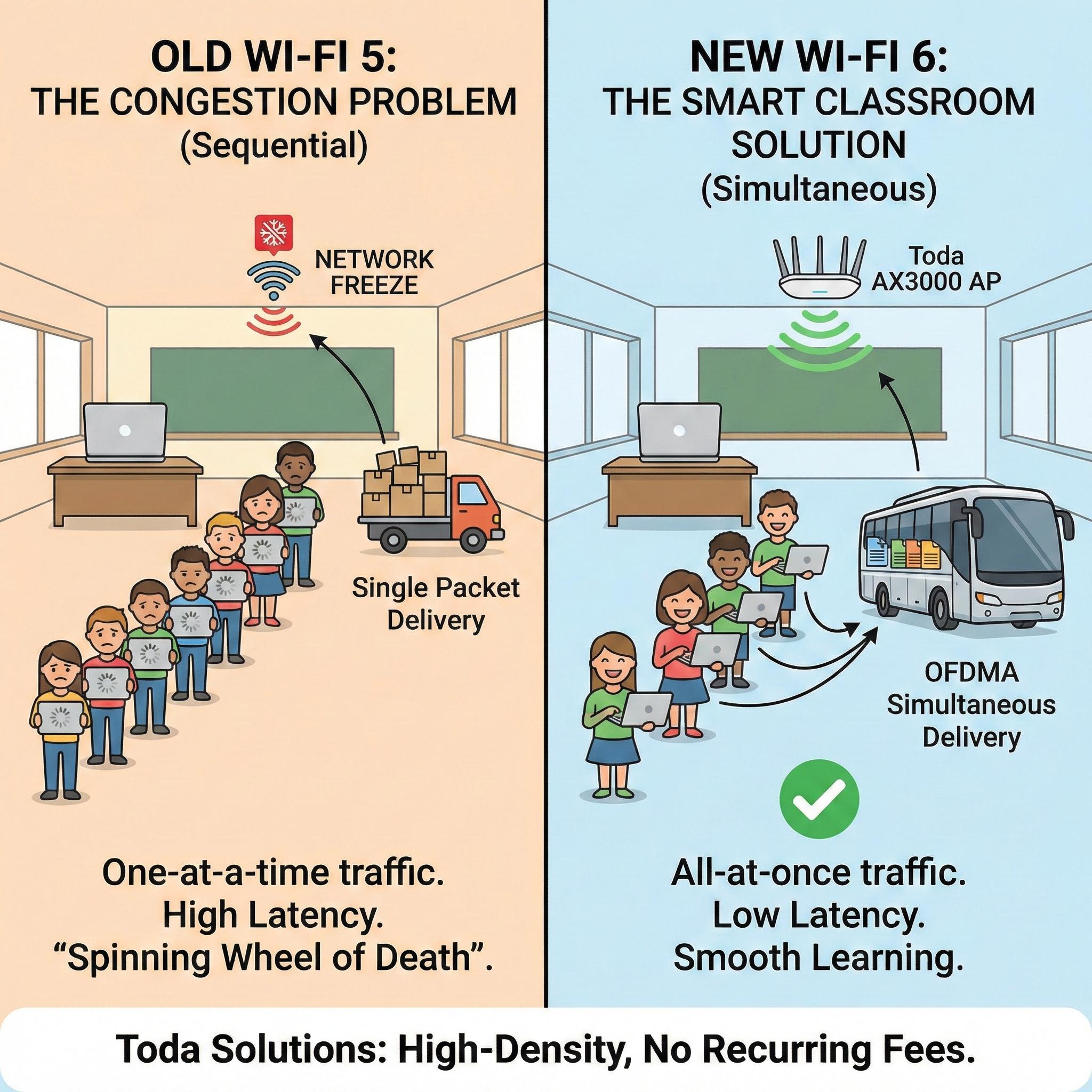
In a traditional Wi-Fi 5 setup, an access point (AP) can only communicate with one device at a time. Imagine a classroom with 30 students. If Student A is downloading a file, Students B, C, and D must queue (for milliseconds) and wait for their turn to communicate with the AP. When all 30 devices attempt to connect simultaneously—for example, at the start of a digital quiz—this queuing causes network congestion, leading to a network freeze.
The Solution: Wi-Fi 6 and OFDMA
This is where Wi-Fi 6 changes the education landscape. Its killer feature is OFDMA (Orthogonal Frequency Division Multiple Access).
-
Wi-Fi 5 is like a fleet of delivery trucks that can only deliver one package at a time (data for one student).
-
Wi-Fi 6 is like a bus that can carry 30 people at once.
Utilizing OFDMA technology, the Toda Wi-Fi 6 AP can divide the wireless channel into smaller sub-channels. It can simultaneously communicate with a teacher’s laptop, a smart whiteboard, and multiple student tablets within a single transmission window.
The Result: When all students in the class click “Submit” on a quiz simultaneously, the dreaded “spinning wheel of death” no longer appears.
Solving the “Noisy Neighbors” Problem (BSS Coloring)
Schools are incredibly dense environments. You often have Classroom 101 right next to Classroom 102, separated only by a thin wall.
In the past, if an AP in Room 101 was transmitting data, the AP in Room 102 would “hear” its signal and wait for the channel to clear before transmitting its own data. This is known as Co-Channel Interference.
Wi-Fi 6 introduces BSS Coloring technology. It allows the AP in Room 102 to “ignore” traffic from Room 101, even though they are on the same channel. This effectively doubles the spectrum capacity in crowded school buildings.
Extending Battery Life (Target Wake Time)
Schools manage hundreds of portable devices, and charging them is a logistical nightmare.
Wi-Fi 6 includes a Target Wake Time (TWT) feature. This allows APs to instruct devices when to “sleep” and when to “wake up” to send data. This intelligent scheduling can significantly extend the battery life of iPads and Chromebooks throughout the school day, ensuring they last until the final bell.
The Budget Reality: Why Choose Toda?
We know that education budgets are tight. Schools often have to choose between buying new textbooks and upgrading their wireless networks.
Many well-known brands price Wi-Fi 6 hardware very high and add mandatory annual software licensing fees.
Toda offers a different approach for Education SIs:
-
Hardware First: Our AX3000 ceiling-mounted APs use the same enterprise-grade chipsets (Qualcomm/MediaTek) as the expensive brands.
-
No Hidden Fees: Once you purchase Toda hardware, you own it. We do not charge any mandatory administrative subscription fees.
-
High-Density Design: Our APs are specifically engineered for high-density environments, with each AP supporting 50+ concurrent users smoothly.
In Conclusion
Without a robust network, a “smart classroom” is nothing more than a room filled with expensive but disconnected screens.
Upgrading to Wi-Fi 6 is the only way to ensure that technology enhances the learning experience rather than hindering it.
Are you involved in bidding for education projects? [Contact the Education Sales Team] to learn about Toda’s “Education Project Pricing.” We can provide support such as data sheets, bidding specifications, and bulk discounts.
Post time: Jan-25-2026


