
Imagine this scenario: You’ve just installed Wi-Fi in a 50-room hotel. Two months later, the hotel manager calls to say they want to change the Wi-Fi password for security reasons.
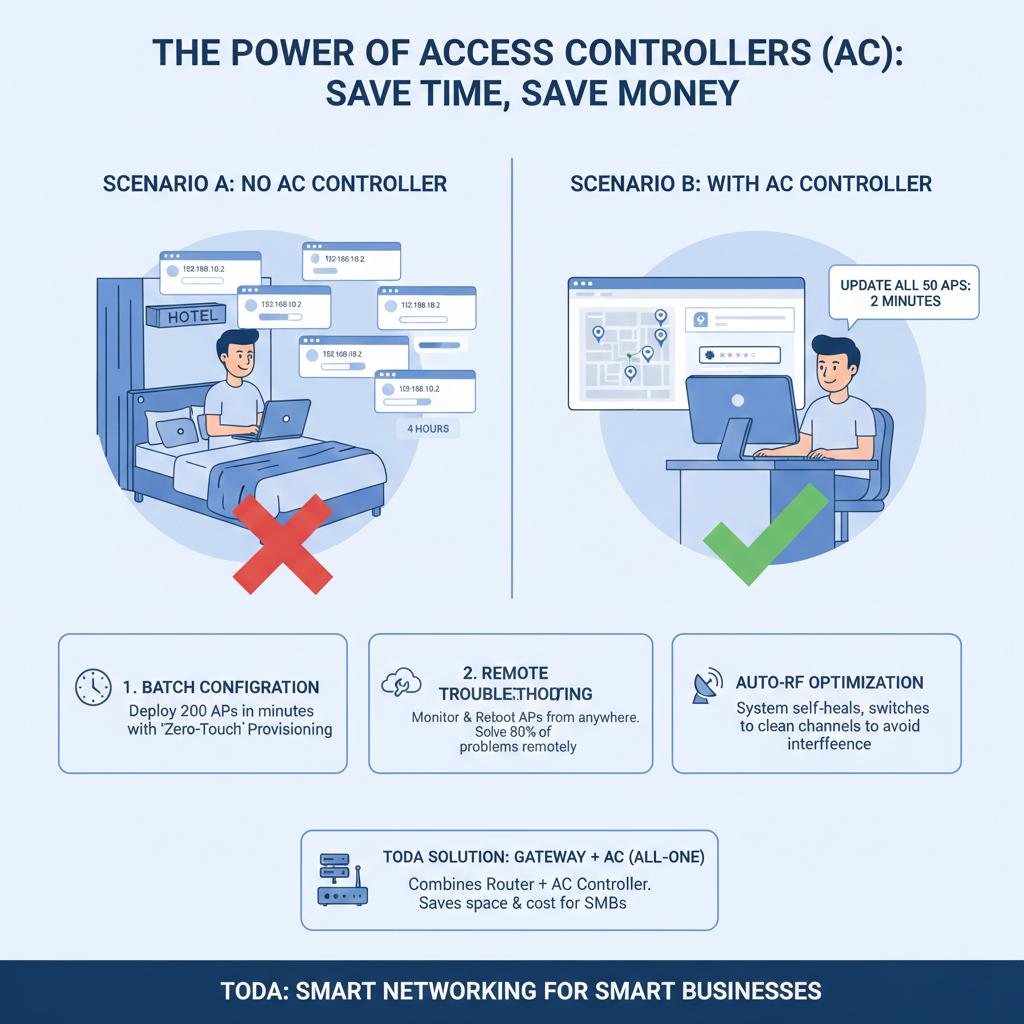
Scenario A (Without an AC Controller): You have to drive to the hotel. You turn on your laptop. You manually log in to 50 different IP addresses (192.168.10.2, 10.3, 10.4…). You copy and paste a new password 50 times. Result: This takes 4 hours.
Scenario B (With an AC Controller): You remotely log in to the Access Controller. You enter the new password once. You click “Apply”. All 50 access points are updated immediately. Result: The entire process takes only 2 minutes.
This is the power of Access Control (AC) systems.
For system integrators and internet service providers, an AC controller is more than just an additional piece of hardware to sell; it’s insurance against labor cost losses.
Toda strongly recommends against deploying more than 3 Access Points (APs) in a project without a controller. Here is why.
What is an AC Controller?
Imagine your Access Point (AP) as a musician in a symphony orchestra. Without a conductor, they might be able to play the correct notes, but they won’t stay in sync.
The AC Controller is the conductor. It is the command center (or central brain) of the entire system. It communicates with all APs via a protocol called CAPWAP. It tells the APs which channel to use, at what power level to transmit signals, and which client connections to accept.
How It Saves You Money (ROI)
1. Batch Configuration (“Zero-Touch” Deployment)
When setting up a warehouse project with 200 APs, you certainly don’t want to configure them one by one after unpacking.
With a Toda AC, you simply connect all 200 APs to the switch. The AC automatically detects them and pushes the “Golden Configuration” (SSID, password, VLAN settings) to all APs simultaneously.
-
Benefit: Physical labor that would have taken several days is reduced to just a few minutes.
2. Eliminate “Truck Rolls” (Remote Troubleshooting)
“Truck Roll” is the industry term for dispatching technical personnel to an on-site location. Every time a vehicle leaves your office, you incur costs (fuel, wages, vehicle wear and tear).
With a Cloud AC, you can monitor the status of the network from your office:
-
Is AP #4 offline? You can try restarting it remotely via the AC.
-
Is the signal weak? You can increase the transmission power (TX Power) from your desktop.
-
Result: You can solve 80% of problems without leaving your seat.
3. Automatic RF Optimization (Self-Healing)
The wireless environment is constantly changing. For example, a neighbor might install a new router on Channel 6, interfering with your client’s network.
Without an AC, your client’s Wi-Fi speed will slow down, and you won’t know why. With a Toda AC, the system detects the interference and automatically instructs your AP to switch to a cleaner channel (such as Channel 1 or 11). It dynamically balances the load without requiring any action from you.
The Toda Solution: Gateway + AC (All-in-One)
We understand that purchasing a dedicated rack-mount server can feel expensive for small projects like cafes or small offices.
That’s why Toda developed an Enterprise Gateway with built-in AC capabilities.
-
It acts as your Main Router (Multi-WAN, Load Balancing).
-
It acts as your AC Controller (Managing up to 32–64 APs).
It saves rack space and reduces hardware costs.
Summary
In 2025, hardware will be cheap, but labor costs will be high.
If you are quoting for a project, adding a modest AC controller may increase the hardware quote by 5%, but it can reduce your long-term maintenance burden by 90%.
Don’t be the kind of installer who is manually updating firmware on Friday nights. Smart system integrators use controllers.
Need a cost-effective management solution? Consider Toda’s new AC Gateway and Cloud-Managed Switch series.
Post time: Jan-24-2026


