
Two devices communicate when connected to the same switch. Move one to the next cabinet and communication fails, even though the uplink is up and both switch menus show the VLAN number. The missing detail is often how frames enter and leave that uplink.
A VLAN existing in a configuration is not the same as that VLAN being carried through every port on its path. Untagged ingress classification, permitted membership and tagged or untagged egress are separate questions. Work through them in the direction the traffic travels, then repeat for the return path.
Follow one frame instead of comparing menu labels
Begin with a known endpoint and record whether it sends tagged or untagged frames. Many ordinary endpoints send untagged traffic; VLAN-aware devices may behave differently. Confirm the actual configuration rather than relying on the device category.
At the receiving switch port, establish how that frame is classified. PVID commonly identifies the VLAN assigned to untagged ingress traffic. At the uplink, establish whether the VLAN is allowed and whether its frames leave tagged. At the next switch, check what the arriving frame means to that port.
TP-Link's 802.1Q configuration guide illustrates the distinction between PVID, acceptable frame types, membership and egress rules. These concepts are useful across a review, but the exact controls and permitted combinations remain platform-specific.
A two-switch worksheet makes the mismatch visible
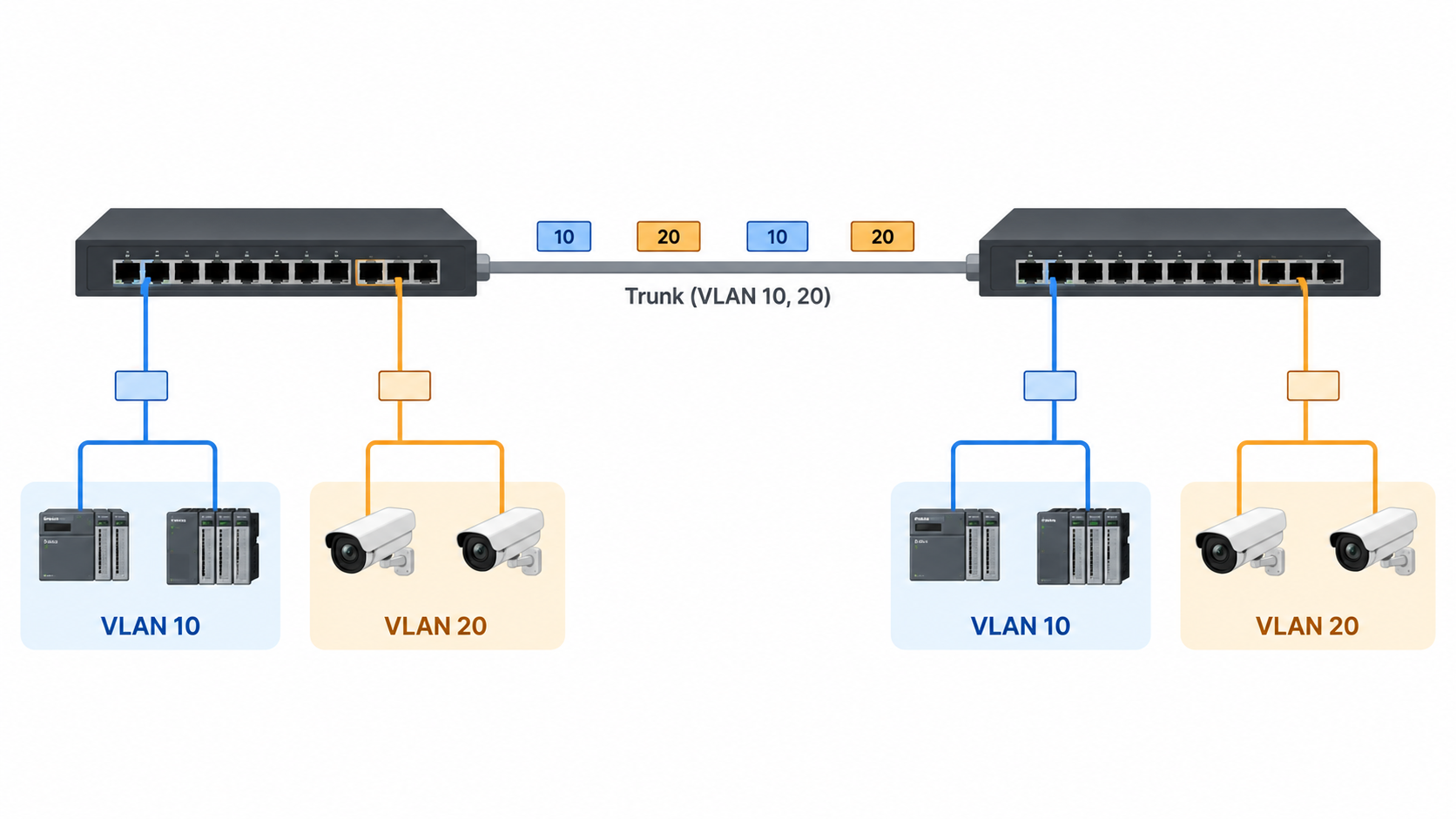
Consider an illustrative design in which controllers use VLAN 10 and cameras use VLAN 20. Each group connects through untagged access ports, while the inter-switch link carries both groups tagged. The intended behavior can be written without assuming a vendor's command syntax:
| Port role | Untagged ingress classification | Required VLAN membership | Intended egress toward the connected device |
|---|---|---|---|
| Controller access port | VLAN 10 | VLAN 10 | Untagged VLAN 10 traffic |
| Camera access port | VLAN 20 | VLAN 20 | Untagged VLAN 20 traffic |
| Uplink on switch A | Explicitly defined by the design | VLANs 10 and 20 | Tagged traffic for both listed VLANs |
| Uplink on switch B | Compatible with the other end | VLANs 10 and 20 | Tagged traffic for both listed VLANs |
The uplink's treatment of any untagged traffic must also be deliberate. Some designs use a defined native VLAN; others use supported tagged-only behavior. Do not leave that question implicit merely because the two application VLANs are tagged.
PVID is not a shortcut for the entire port configuration
Changing a PVID can classify incoming untagged traffic, but it does not universally create the required membership or select every outgoing tagging rule. Some interfaces link these settings; others expose them separately. Verify the resulting behavior on the installed platform.
A common incomplete change is to set an endpoint port's PVID while leaving the desired VLAN absent from its allowed membership, or to mark a VLAN untagged on egress without assigning incoming untagged frames to the intended VLAN. The interface may look partly correct while one direction still fails.
Use the device's supported status pages and, where necessary, a packet observation at a suitable point. A saved configuration is evidence of intent. The forwarding result establishes whether that intent has been implemented correctly.
Native-VLAN mismatches can misclassify otherwise valid traffic
On a trunk that carries a native VLAN untagged, the receiving end needs a compatible understanding of those untagged frames. If one end sends a service untagged and the other classifies it into a different VLAN, the physical link can remain healthy while the service enters the wrong broadcast domain.
Cisco's VLAN trunking guide documents native-VLAN and allowed-list behavior for its platform. Check the corresponding behavior on both actual devices, especially when they come from different vendors.
Do not assume that using the same port-mode name makes the configurations equivalent. Access, trunk, general and hybrid labels can expose different controls. Translate the design into observable ingress and egress behavior, then configure the appropriate controls on each side.
Check every intermediate device in the path
An unmanaged switch, media converter or wireless bridge between the cabinets may need to transport tagged frames with the required size and behavior. Confirm support for the exact model. A device passing ordinary untagged traffic does not prove that the tagged application path has been accepted.
If the uplink is a link-aggregation group, inspect the group configuration and its members according to the platform's rules. A mismatch among members can create intermittent or flow-dependent symptoms that are difficult to reproduce with one test session.
Keep the path drawing current. An undocumented intermediate switch can explain why a configuration comparison between the two visible endpoints appears correct while traffic still fails.
Separate Layer 2 reachability from routing and policy
If both endpoints are intended to be in the same VLAN and subnet, investigate the Layer 2 path and their local addressing first. If they belong to different VLANs, an appropriate routed path and policy are required. A tagged trunk carries VLANs; it does not automatically allow communication between them.
DHCP behavior can provide useful clues. An endpoint receiving an address from the wrong scope may have been placed in the wrong VLAN, but confirm the DHCP design before concluding that. A device with no address can also suffer from a relay, server or policy problem even when the VLAN path is correct.
Use a small test matrix: same VLAN on one switch, same VLAN across the uplink, then the required routed service. Each step narrows the boundary. Avoid changing VLAN membership, IP addressing and firewall policy simultaneously unless the approved implementation plan requires it.
Protect the management path while making the correction
Before changing the VLAN carrying switch management, preserve the current configuration and establish a supported recovery method. A remote change can remove the route through which the operator would undo it. Plan the sequence and verify the new path before removing the old one where the platform and design permit.
After the correction, test both directions and the intended isolation. Connectivity alone is not enough if traffic now reaches an unintended VLAN. Confirm the allowed services and the expected blocked paths using the project's approved test plan.
For a TODAHIKA Layer 2 managed switch, provide the port worksheet, endpoint tagging behavior and management requirement with the inquiry. Request the exact model's configuration and recovery guidance. Keep the final worksheet, saved configuration and test results together so later port moves preserve the intended VLAN behavior.
Post time: Oct-10-2026


